There are no items in your cart
Add More
Add More
| Item Details | Price | ||
|---|---|---|---|

Why VXLAN? The 4096 VLAN Limit Explained and How VNI Scales Networks to 16 Million
By Vishnu Dutt · June 17, 2026 · 14 minute read
Every network engineer who has worked with VLANs hits the same wall at some point in their career. You can create only 4,096 VLANs in your switching network. Not one more. For a small office or a single company data center, that number sounds huge. But the moment you walk into a real cloud data center where many customers share the same physical infrastructure, this number starts to look very small very quickly.
This is exactly the problem VXLAN was born to solve. In this post I want to walk you through the why first. Why we have only 4,096 VLANs. Why this number is not enough today. And only then we will see how VXLAN and the VNI field give us 16 million network segments instead of 4,096.
I follow the same teaching style here that I follow in my BridgeWhy courses. We start with the why, because once you understand the mind of the engineer who designed the protocol, the protocol becomes very easy to remember. You will never need to memorise the packet format. You will recall it naturally, because you know what problem every field was created to solve.
Here is the video walkthrough on YouTube. Watch it for the whiteboarding and the packet flow.
What you will learn
1. Why traditional VLANs are limited to 4096
Let us start at the source. Why does a normal switched network allow only 4,096 VLANs and not more.
To answer this, you need to look at one specific field inside the Ethernet header. This field is called the 802.1Q tag. The 802.1Q tag is the small label that a switch adds to a frame the moment it sends the frame over a trunk port to another switch.
Imagine two switches connected by a trunk link. Host A in VLAN 10 sends a packet. When this packet reaches the first switch, the switch must somehow tell the second switch which VLAN the frame belongs to. Otherwise the second switch would have no way to know whether to forward this frame inside VLAN 10 or VLAN 20 on its side. To solve this, the switch inserts the 802.1Q tag into the frame. This tag carries the VLAN number. The receiving switch reads the tag, removes it, and forwards the inner frame inside the correct VLAN.

DIAGRAM 1 (802.1Q Ethernet frame structure showing the 12 bit VLAN ID field)
That is the entire reason. No magic. No vendor limitation. No configuration choice. Just a 12 bit field that was decided many years ago, at a time when nobody imagined that a single physical network would one day need to carry traffic for thousands of separate customers.
Why First Thinking: When the 802.1Q standard was being drafted in the late 1990s, 4,096 VLANs felt like a future proof number. The whole idea of a single physical network hosting thousands of customers had not yet taken shape. The bit count looked safe at the time. We are now living in the future they did not plan for.
2. How a Layer 2 broadcast domain actually behaves
Now that you know the why behind the 4,096 limit, let me show you a second problem with traditional VLANs. This one is not about how many VLANs exist. It is about how broadcast traffic flows inside a VLAN once it does exist.
Consider the topology I am using in this lesson. We have six switches. SW1 and SW2 are the spine switches. SW3, SW4, SW5, and SW6 are the leaf switches. Every leaf switch is connected to both spine switches. So SW1 connects to SW3, SW4, SW5, and SW6 with one Ethernet link each. SW2 also connects to all four leaf switches the same way.
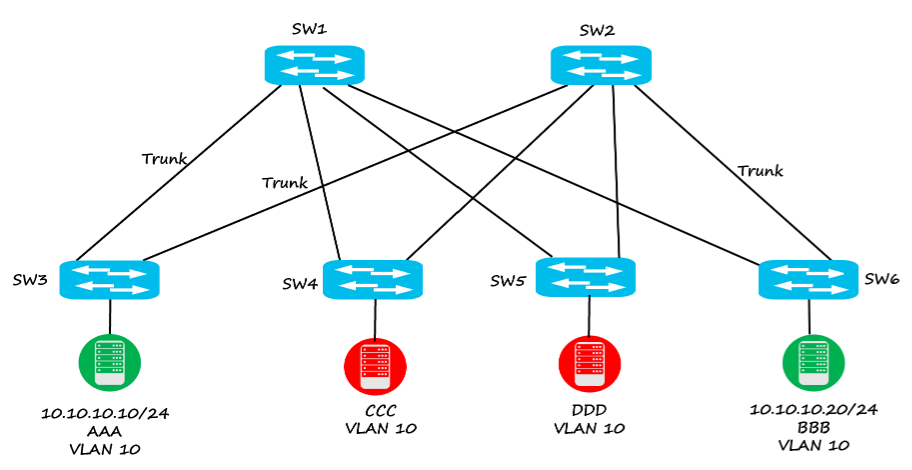
DIAGRAM 2 (Spine and leaf topology with hosts A, B, C, D placed in VLAN 10)
In our scenario, host A sits on SW3 in VLAN 10. Host B sits on SW6, also in VLAN 10. Host C sits on SW4 and host D sits on SW5, both also in VLAN 10. In the traditional model, every link between the switches is a trunk link. Spanning Tree Protocol will block some of these links to avoid loops, but logically VLAN 10 is extended across all the switches. Now let us see what happens when host A wants to talk to host B. Host A knows the IP address of host B but not the MAC address. So host A sends an ARP request, which is a broadcast frame.
This ARP frame arrives at SW3. SW3 sees that the frame came from VLAN 10. It adds the 802.1Q tag with the value 10 and floods the frame out of every other interface that is part of VLAN 10. The frame travels through the trunk links, reaches the spines, comes back down to the other leaves, and eventually reaches host B. Host B replies. Communication starts. Beautiful.
But here is the question I want you to sit with for a moment. Hosts C and D are also in VLAN 10. If host C sends an ARP request, does that ARP also reach SW3 and SW6, where host A and host B are sitting? The honest answer is yes. Because in a Layer 2 network, every switch that has VLAN 10 configured will see every broadcast in VLAN 10. This is the very definition of a broadcast domain.
You might ask, can I do something clever so that the ARP from host C reaches only SW4 and SW5, and not SW3 and SW6, even though all of them are configured with VLAN 10? In a pure Layer 2 world, the answer is no. The broadcast domain has no internal boundaries. The only way to keep C and D separate from A and B is to put C and D in a different VLAN, say VLAN 20.
This rigidity is what makes the old model painful in modern data centers. Every customer needs many VLANs, and you cannot reuse VLAN numbers for different customers, because the moment you reuse a number, two customers would land in the same broadcast domain.
3. The real pain point in multi-tenant data centers
Let me bring this to life with a story, because the problem becomes very clear the moment you imagine a real business scenario.
Picture a company called Sports India Private Limited. Their business is doing very well and they have built a big data center. The head network engineer is Mr Rahul. Mr Rahul has designed the entire data center using the traditional switching model, with trunk links between every switch. He has the full pool of 4,096 VLANs at his disposal.
Now Mr Rahul decides to start renting space in his data center to other companies. The first customer arrives. Let us call them Customer A. Customer A says, I want to place my own servers in your data center, and I will need some VLANs to separate my server groups.
Mr Rahul thinks for a moment and replies, fine, I will keep 2,000 VLANs for my own internal use and give 2,000 VLANs to you. So Mr Rahul uses VLAN 1 to VLAN 2,000 and Customer A uses VLAN 2,001 to VLAN 4,000. Customer A is happy with this arrangement.
But Mr Rahul has one strict rule. He tells Customer A, please do not use any of my VLAN numbers. Because if you accidentally use VLAN 100 and I am also using VLAN 100, your traffic and my traffic will mix on the same trunk links. The switches will not be able to tell them apart. That would be a security disaster.
Now Customer B arrives. Customer B also wants VLANs. Mr Rahul looks at his pool. He has already given 2,000 VLANs to Customer A. He has 2,000 for himself. He has zero left for Customer B.
The best Mr Rahul can do is squeeze. He can request Customer A to release 1,000 VLANs and give them to Customer B. But what happens when Customer C, D, and E arrive? What happens when one thousand customers walk in, and each one needs just ten VLANs? Mr Rahul would need ten thousand VLANs. But the maximum he can ever offer is 4,096.
This is not Theory: This is exactly the situation inside every public cloud and large private cloud today. AWS, Google Cloud, Azure, every hyperscale provider, and every enterprise private cloud has the same multi tenant requirement. Without a way to scale beyond 4,096, none of these clouds could exist in their current form. The need to break past 4,096 is the very reason VXLAN was created.
4. Meet VNI, the 24 bit Virtual Network Identifier
Now we begin the second half of the story. The solution side.
The engineers who designed VXLAN looked at the problem and asked one very simple question. If the 12 bit field is the bottleneck, why not create a new field that is bigger? That new field is called the VNI, which stands for Virtual Network Identifier. The VNI is 24 bits long. And 2 to the power 24 equals 16,777,216. We usually round this to 16 million for simplicity. That is roughly four thousand times more network segments than the old 4,096 limit.
But this raised a follow up question for the designers. Where do you put a 24 bit field? You cannot just expand the 802.1Q tag from 12 bits to 24 bits, because every Ethernet switch on the planet already understands the 12 bit version. Changing it would break compatibility with billions of devices already deployed.
So the VXLAN designers chose a different path. Instead of changing the Ethernet frame, they decided to wrap the entire Ethernet frame inside an IP packet. The new wrapper is called the VXLAN header, and it carries the 24 bit VNI.

DIAGRAM 3 (VXLAN encapsulation )
This is a very important shift in thinking. In the old VLAN model, the links between switches are Layer 2 trunk links. In the VXLAN model, the links between switches become Layer 3 routed links. The Ethernet frame from the host is encapsulated inside a UDP packet, and the UDP packet is routed across the fabric like any normal IP packet.
Why is this such a clever move? Because the moment the links are Layer 3, you can use every single one of them. There is no Spanning Tree blocking any link. There is no Layer 2 loop concern. Every spine to leaf path can carry traffic at the same time. The data center fabric becomes faster, more efficient, and far easier to scale.
5. How VXLAN makes the VLAN number locally significant
Now we come to the most beautiful part of VXLAN. The part that solves Mr Rahul's problem in one elegant stroke. In the VXLAN model, the VLAN number on a switch is no longer the identity of the network across the whole data center. The VLAN number becomes a local detail of that particular switch. The real identity of a network segment across the data center is the VNI.
Let me show you how this works on our same topology. On SW3, host A is in VLAN 10. The network engineer configures a mapping that says, on this switch, VLAN 10 is equivalent to VNI 5010. On SW6, host B is also in VLAN 10. The engineer configures the same mapping there too. On SW6, VLAN 10 is equivalent to VNI 5010.
Now when host A sends a packet to host B, here is what happens.
a. Host A creates a normal Ethernet frame
Host A builds the frame with source MAC A.A.A and destination MAC B.B.B, places it on the wire in VLAN 10, and the frame reaches SW3
b. SW3 encapsulates the frame in VXLAN
SW3 sees that the frame came from VLAN 10. Because VLAN 10 is mapped to VNI 5010 on this switch, SW3 wraps the frame inside a VXLAN header carrying VNI 5010, then a UDP header, then an outer IP header. The outer source IP is the loopback of SW3 (say 3.3.3.3) and the outer destination IP is the loopback of SW6 (say 6.6.6.6).
c. The fabric routes the packet to SW6
The encapsulated packet is routed across the Layer 3 fabric, hop by hop, through any path between SW3 and SW6. Spanning Tree is not involved. All links are active.
d. SW6 decapsulates and forwards into VLAN 10
SW6 receives the IP packet, removes the outer headers, reads the VXLAN header, and sees VNI 5010. SW6 looks up its mapping and finds that VNI 5010 is equivalent to VLAN 10 on this switch. SW6 then forwards the inner Ethernet frame into VLAN 10, and host B receives it as if host A were attached to the same switch.
Now here is the magic moment. On SW4 and SW5, hosts C and D are also in VLAN 10. But the engineer maps VLAN 10 on these two switches to a different VNI, say VNI 6010.
When host C sends a frame, SW4 wraps it with VNI 6010, not 5010. The traffic flows from SW4 to SW5, where it gets unwrapped and forwarded into VLAN 10 on SW5.
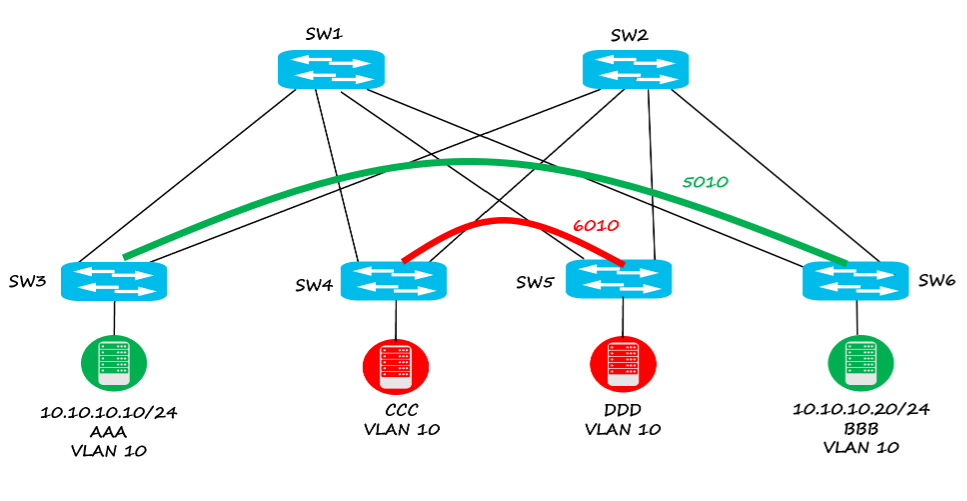
DIAGRAM 4 Two separate VXLAN tunnels. VNI 5010 (between SW3 and SW6) and VNI 6010 (between SW4 and SW5)
Notice what just happened. Host A and host C are both in VLAN 10. But host A traffic carries VNI 5010 on the fabric, and host C traffic carries VNI 6010 on the fabric. Host A and host C never see each other's broadcasts. They are completely isolated, even though they share the exact same VLAN number on their respective switches. This is what we mean when we say the VLAN number is now locally significant in a VXLAN network. The VLAN number matters only on the switch where the host is connected. Across the data center, the VNI is what really identifies the network.
Common misunderstanding: Many learners say that the VNI is locally significant. That is wrong. The VNI is globally significant. The same VNI must be configured on every switch that should belong to the same network segment. It is the VLAN number that has become locally significant in a VXLAN fabric, not the VNI.
6. The intelligent control plane behind the scenes
In my live classes I describe this as the work of an intelligent guy who is watching the entire network from the sky. That intelligent guy is the control plane.
In production VXLAN networks, this control plane is usually BGP EVPN. Every leaf switch tells the BGP EVPN control plane which VNIs it has locally and which MAC and IP addresses sit behind each VNI. The control plane shares this information with every other leaf switch in the fabric. So SW3 learns that VNI 5010 also lives on SW6 at loopback 6.6.6.6, and SW4 learns that VNI 6010 also lives on SW5 at loopback 5.5.5.5.
BGP EVPN is a topic deep enough to fill an entire course on its own, and we cover it step by step in the full course. For now, just remember that there is a smart control plane behind the scenes that builds the VNI to switch mapping, so the data plane encapsulation always knows the right destination.
7. Mr Rahul's data center, the VXLAN way
Let us return to Mr Rahul and see how his world transforms when he rebuilds the data center using VXLAN.
Every link between leaf and spine is now a Layer 3 routed link. There is no Spanning Tree blocking anything. Every path is active. The base fabric is fast and loop free. Now Mr Rahul still has only 4,096 VLAN numbers per switch. That has not changed, because the Ethernet standard still uses the 12 bit 802.1Q tag inside the switch.
What has changed is how those VLAN numbers are interpreted across the data center.
Mr Rahul tells himself, I will use VLAN 1 to VLAN 4,096 on my own switches, and I will map them to VNI 1 to VNI 4,096.
Customer A arrives. Mr Rahul says to them, you can also use VLAN 1 to VLAN 4,096 on your own switches. The only rule is that we will map your VLAN numbers to a different VNI range. We will map your VLAN 1 to VNI 5001, your VLAN 2 to VNI 5002, and so on up to VLAN 4,096 mapped to VNI 9,096.
Customer B arrives next. Mr Rahul again says, no problem, use any VLAN numbers you like on your switches. We will map your VLANs to VNIs in the range 10,001 to 14,096.
Notice what is happening here. Every customer feels like they own the entire 4,096 VLAN space, because they get to pick whatever VLAN numbers they want on their own switches. But internally on the fabric, every customer's traffic carries a unique VNI, so traffic from one customer can never cross into another customer's network.
How many customers can Mr Rahul support like this? In theory, he can host up to 16 million separate network segments on the same physical fabric. Even if every customer takes ten VNIs, that is still 1.6 million customers. This is the kind of scale the modern cloud actually needs.
9. Common interview questions
Interview Alert
Questions you should be ready to answer
10. What to learn next
This post has covered the why and the conceptual how of VXLAN. But VXLAN in a real production network involves many more topics that you will need to master if you want to work confidently in a modern data center. You will need to understand the underlay routing protocol that gives reachability between leaf and spine. You will need to understand how BGP EVPN learns and shares MAC and IP information across all the leaf switches. You will need to understand how multicast or ingress replication handles broadcast and unknown unicast traffic in the underlay. You will need to understand how VRFs and route distinguishers keep multiple tenants separate in the control plane. And of course, you will need to see what all of this actually looks like in packet captures.
Go Deeper: VXLAN with BGP EVPN from Scratch
If you want to master VXLAN end to end, this is the next step after reading this post. The full course on BridgeWhy walks you through every topic from the ground up. It includes the switching foundations and the multicast concepts which are the real base of VXLAN EVPN, the underlay design, the BGP EVPN control plane in detail, packet captures of every important exchange, and practical lab walkthroughs. The course is built in the same why first style you have just experienced in this post.
VXLAN is not a difficult protocol once you understand the why. The story starts with one tiny bottleneck, the 12 bit 802.1Q tag, and ends with a clean solution that gives us 16 million network identifiers, multi tenant freedom, and a loop free Layer 3 fabric. Every other VXLAN topic you will study in your career builds on the foundation we have laid in this post.
If you take just one thing away from this post, take this. The number 4,096 was never magical. It was the result of an engineering choice made in a different era. VXLAN does not break that choice. It simply moves the network identifier into a new place, where the field is bigger, the network is Layer 3, and the data center can finally scale to the size that the modern internet actually demands.
Happy learning, and I will see you in the next post.
About Vishnu Dutt
Through BridgeWhy, Vishnu helps network engineers, students, and interview candidates build deep, lasting understanding instead of surface level memorisation. You can follow more lessons on the BridgeWhy YouTube channel and explore full courses on bridgewhy.com.